

Corpus info page – corpus statistics and details
The corpus information page provides an overview of the selected corpus, including its name, technical identifier, description, language, and the statistics of tokens, words, sentences, paragraphs, documents, and unique lexical items. It also displays the available text types (metadata), tagset information, subcorpora, and with parallel corpora also the aligned languages.
To display the page:
Option 1
Click the info_outline icon next to the name of the corpus at the top center of each screen

Option 2
Go to the corpus dashboard dashboard and click CORPUS INFO.
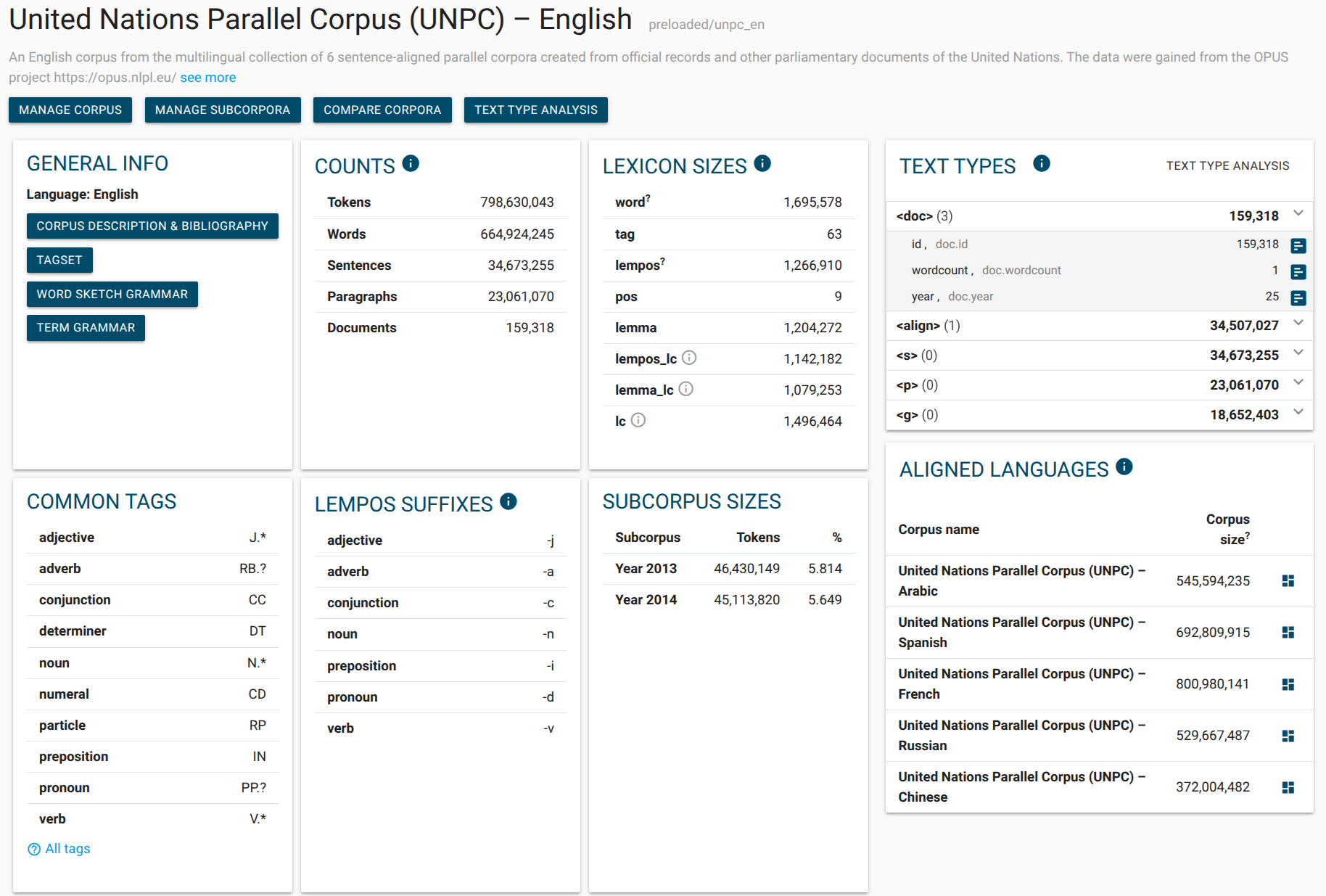
The name of the corpus.
Technical name (unique identifier), only needed when using the API and in Lexonomy. Also useful to distinguish corpora with identical names.
Corpus description.
Information about the language of the corpus, the links to the webpage with the corpus information, tagset, sketch and term grammars.
The total numbers found in the corpus. Available information differs between corpora – a corpus without paragraphs has no info about them.
The number of unique items in the corpus. Each is counted only once even if it appeared in the corpus many times.
Shows the number of structures in the corpus and structural attributes (metadata).
A list of some part-of-speech tags used in the corpus.
Lempos suffixes used in the corpus.
A list of subcorpora (user or preloaded) available in the corpus with information about their sizes. The sizes are estimates only.
Aligned languages table lists corpora that can be used in parallel with the selected corpus. This only applies for parallel corpora.
How to read TEXT TYPES
This is how to read the text type box : (referring to the screnshot below)
This corpus contains 4 types of structures: doc, p, g, s. There are 2,047,129 doc structures (documents) in the corpus. Documents come with 4 types of metadata (text types): Author, Date, Newspaper and Year.
Newspaper has 18 unique values (=data come from 18 different newspapers). To see the list of the 18 newspapers, click on insert_chart
Year has 8 unique values (=data come from 8 different years). To see the list of the 8 years, click on insert_chart
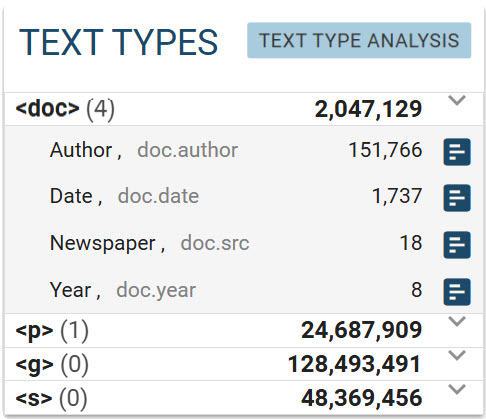
Click on TEXT TYPE ANALYSIS to see the text type statistics and the diagram.
The box also gives the exact names of the attributes as they appear in the source data. For example, the interface uses “Newspaper” for practicality, but the attribute is not called “Newspaper” but src in the source data. Other attribute names are lowercased in this corpus. This is important when referring to the attribute in CQL.