GDEX – Good Dictionary Examples

GDEX stands for “Good Dictionary EXamples”. It is a tool for the evaluation of sentences to find suitable dictionary examples or good examples for teaching purposes. Sentences are evaluated with respect to their length, the use of vocabulary, presence of controversial topics (politics, religion…) and other criteria.

Introduction

GDEX stands for “Good Dictionary EXamples”. It is a tool for evaluating sentences with respect to their suitability to serve as dictionary examples. or examples for teaching purpoes. It identifies such sentences automatically, making the process of finding suitable sentences much more efficient. It can effectively exclude poor sentences and offers the user a pre-sellected set of sentences with a much higher chance of containing good sentences for the purpose of dictionary examples.

The GDEX configuration is fully customizable. It can take into account linguistic and cultural restrictions. To request a bespoke GDEX configuration, please contact inquiries@sketchengine.eu

To use GDEX:

  • Select a corpus and make a concordance.
    The concordance can be generated in any way: using any of the concordance searches or jumping to the concordance from other tools via the context menu more_horiz, e.g. the menu next to a collocation in the word sketch.
  • Click the button in the toolbar above the concordance.
  • Specify how many sentences should be evaluated.
    A higher numbrer will evalute more sentences which increases the chance of finding more “nice” sentences but the evaluation takes longer. Reducing the number speeds the process up but reduces the chances of finding enough nice sentences.

Alternative GDEX configurations can be selected, if available. (The configuration selected here is also used in TickBox Lexicography (TBL).)

Working with GDEX result

The sentences will be sorted by the best GDEX score from best to worst. The sentences often require some postediting before using them as dictionary examples or as sentences for teaching. Despite this, the use of GDEX makes the process of developing example sentences much more effective.

Custom GDEX

Users can develop their own GDEX configuration to make the filtering more restrictive or permissive. For example, sentences to use with young learners may require stricter criteria. See manual for GDEX .

You may like to contact us first before starting a major GDEX project.

Without GDEX

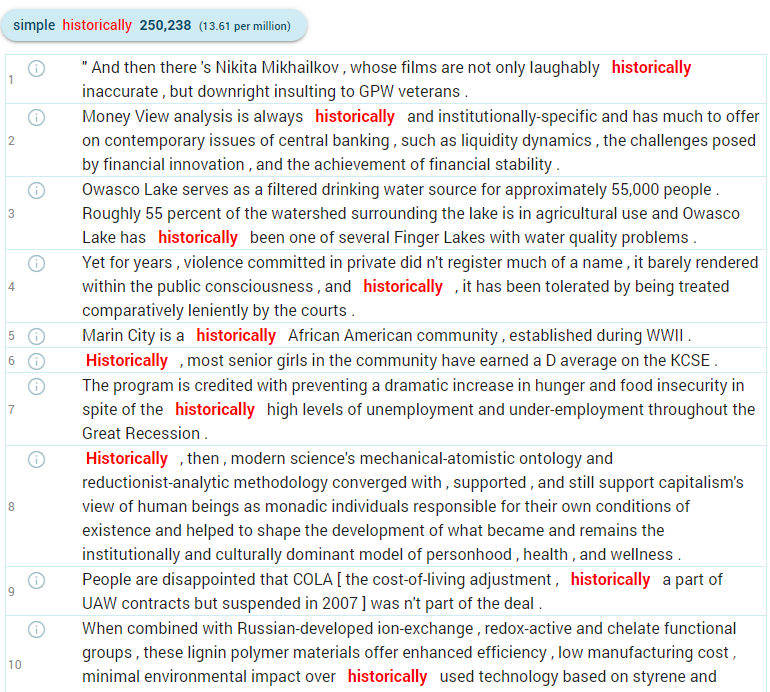
Normal concordance for the word historically. GDEX not applied.

Good Dictionary Examples not applied
With GDEX

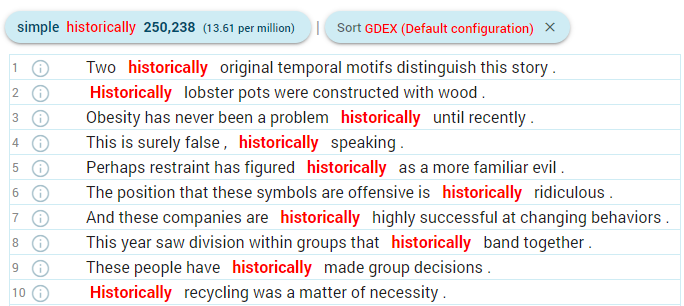
The same concordance but with the first 3,000 lines evaluated by GDEX and sorted by the GDEX score.

Concordance with Good Dictionary Examples

How does it work

A concordance has to be generated to use GDEX. The GDEX tool then evaluates the sentences and sorts them from the best to worst. The number of sentences to be evaluated has to be specified. A random sample of the same size is generated from the sentences in the concordance and evaluated.
To activate GDEX, click the button in the toolbar above the concordance results.

Alternative GDEX configurations

If more than one GDEX configuration is available, use the dropdown list to select it. The configuration selected here will also be used in TickBox Lexicography.

User configurations

Users can create their own configuration to apply more restrictive or more permissive criteria on the sentences depending on their intended use. For example, teaching materials for children may require a stricter configuration to exclude unsuitable sentences.

User configurations can be uploaded to Sketch Engine by going to My account – My Sketch Engine. (Local installations need to register gdex configurations manually.)  User configurations can also be shared with other users or user groups.

GDEX configuration introduction

GDEX configuration files are written in YAML (Wikipedia.org) which is a human-readable (and human-editable) format also suitable for effective machine processing. The actual formula for calculating sentence scores is an expression in the Python programming language. Its syntax is limited to basic mathematical and logical operations, as well as function calls to pre-defined GDEX classifiers. Several variables such as the values of positional attributes are available. Named variables defined in the configuration file, typically regular expressions, can also be referenced in the formula.

The file contains two top-level keys – the mandatory formula and optional variables. Unless the formula fits on a single line, it must be preceded by the > YAML symbol for multi-line values. YAML does not allow the tab character, so you must use spaces for indentation. This is what a simple configuration file may look like:

formula: >
    (50 * is_whole_sentence() * blacklist(words, illegal_chars) * blacklist(lemmas, parsnips)
    + 50 * optimal_interval(length, 10, 14)
    * greylist(words, rare_chars, 0.1)
    * greylist(tags, pronouns, 0.1)
    ) / 100
variables:
    illegal_chars: ([<|][>/\^@])
    rare_chars: ([A-Z0-9'.,!?)(;:-])
    pronouns: PRON.*
    parsnips: ^(tory|whisky|cowgirl|meth|commie|bacon)$

The formula must produce a number between 0 (worst) and 1 (best). Values outside this range will be changed to its nearest limit.

Apart from the variables (actually constants) defined in the configuration, these important ones are available:

  • length – sentence length (number of tokens including punctuation)
  • kw_start and kw_end – a position of the keyword (range: 0–length)
  • words, tags, lemmas, lemposs, lemma_lcs – a list of positional attributes (attribute name + “s”)
  • illegal_chars – characters which must not appear in the sentence at all (sentences containing them will be penalized)
  • rare_chars – characters should be avoided but not as strictly as  illegal_chars
  • pronouns – substituent, in this case, matches all tokens with the PoS tag PRON
  • parsnips – a list of words from taboo topics, sentences with these words are penalized

This is a general example of how variables in the GDEX configuration can work and can be named. You can name them differently or add more variables for checking further sentence  features.

The attribute lists can be used as a whole (for example as a parameter to a classifier) or you can even access individual tokens using standard Python syntax. For example, words[0] is the first word in the sentence and tags[-1] is the tag of the last token.

Classifiers

blacklist

blacklist(tokens, pattern) returns either 1 if none of the tokens (e.g. words, lemmas etc.) matched pattern (regular expression), 0 otherwise

greylist

greylist(tokens, pattern, penalty) is similar to blacklist, but you can specify a penalty that will be subtracted from 1 for each token matching pattern down to 0. With a penalty of 1, it behaves as a blacklist.

optimal_interval

optimal_interval(value, low, high) returns 1 if value is between low and high. Outside this range, the score linearly rises from 0 at low/2 to 1 at low and falls from 1 at high to 0 at 2*high. For value lower than low/2 or higher than 2*high, the score is 0. Usually used with length.

is_whole_sentence

is_whole_sentence() (mind the parentheses) returns 1 if the sentence starts with a capitalized word and ends with a full stop, question mark or exclamation mark. Otherwise, it returns 0.

word_frequency

word_frequency(word) returns the absolute frequency of the given word in the corpus. word_frequency(word, normalize) returns the relative frequency per normalize tokens. For example: word_frequency(words[1], 1000)

keyword_position

keyword_position() returns a number between 0 and 1, starting at zero for a keyword at the beginning of the sentence, and rising in equal increments (depending on the length of the sentence) to 1 for a keyword at the end of the sentence.

keyword_repetition

keyword_repetition() returns the number of occurrences of the keyword in the sentence.

For local installations only

Nothing needs installing when using GDEX in Sketch Engine on www.sketchengine.eu This page gives information for local installations only.

GDEX is distributed as Python distutils packages that is installed in a standard way:

python setup.py install

Sketch Engine automatically detects gdex (must be in PYTHONPATH) and unlocks respective functionality.

Dependencies:

Adding configurations

The online interface provides a special page for uploading user configurations to Sketche Engine. Local installations need to modify gdexpath variable in run.cgi in section # ConcCGI options.

The value should contain a list of tuples (‘configuration_name’, ‘full_path_to_the_configuration). E.g.:

class BonitoCGI (WSketchCGI, UserCGI, WSEval):
    ...
    # ConcCGI options
    gdexpath = [('Shorter', '/corpora/gdex/configurations/shorter')]
    ...

Alternatively a path to default configuration of a corpus can be set in its registry file using GDEXDEFAULTCONF.

References

Adam Kilgarriff, Miloš Husák, Katy McAdam, Michael Rundell and Pavel Rychlý (2008). GDEX: Automatically finding good dictionary examples in a corpus. In Proceedings of the 13th EURALEX International Congress. Spain, July 2008, pp. 425–432.